Project Kestrel receives a major workflow update with the new Culling Assistant and guided in-app tutorials.
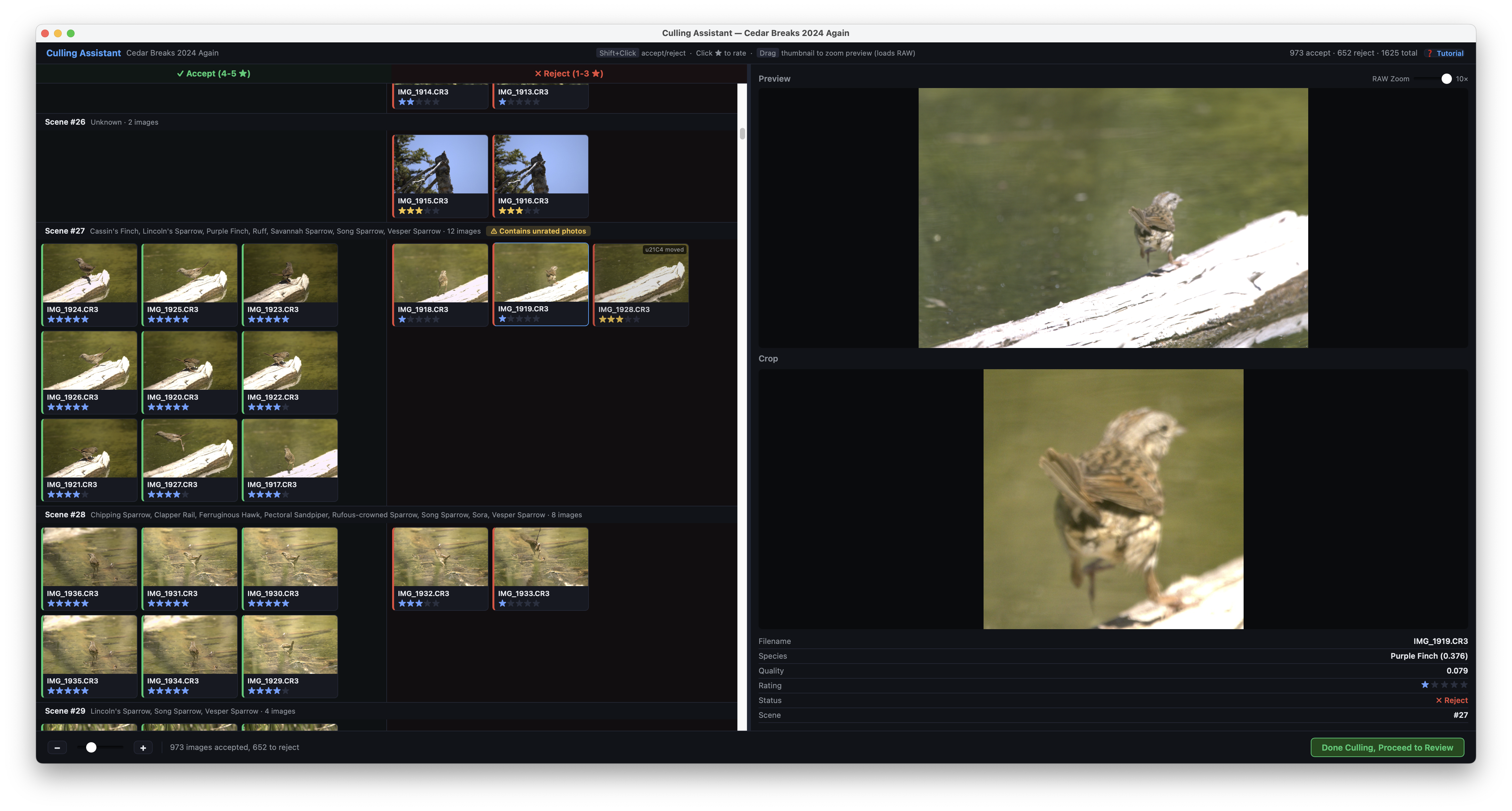
- New Culling Assistant: Automatically organizes photos into Accept and Reject piles based on Kestrel's rating and analysis.
- Faster review: Click any image to load a full-resolution preview and cull rapidly scene-by-scene.
- Quick reassignment: Use Shift+Click to move a photo between Accept and Reject.
- Autosave progress: Culling decisions are preserved automatically while you work.
- Safe-by-design: Kestrel only moves rejected images into a dedicated rejects folder and does not delete your photos.
- New In-App Tutorials: Click Tutorial for guided walkthroughs of both the main window and culling assistant.
Minor changes: New Privacy Policy and Terms of Use, updated usage data policy with optional advanced telemetry opt-in, plus bug fixes and UI improvements.
Coming soon: Video walkthrough on projectkestrel.org/tutorial and XMP sidecar export for Adobe Lightroom workflows.
Feedback wanted: We're especially interested in feedback on the culling threshold behavior (currently ratings below 4 stars default to reject). Share your ideas via projectkestrel.org/contact or the in-app feedback feature.